

Description
Program Hummingbird Bit & micro:bit on Chromebook
The BlueBird Connector is a specialized tool designed to bridge the gap between Chromebook users and physical computing hardware. It enables seamless programming of the Hummingbird Bit and micro:bit devices using the Snap! visual programming environment directly on Chrome OS. This solution is tailored for educators and students in STEM education, offering a streamlined way to engage with robotics, coding, and sensor-based projects without requiring a traditional PC.
Overview
Designed specifically for the Chrome OS ecosystem, the BlueBird Connector serves as a critical interface between Chromebook hardware and programmable robotics kits. It allows users to connect their Hummingbird Bit or micro:bit via USB and launch the Snap! programming environment directly from the tool. This eliminates the need for complex setup procedures or external software installations. The tool is ideal for classroom settings, after-school programs, and home learning environments where Chromebooks are the primary computing device.
By integrating Snap!—a block-based programming language known for its intuitive interface—the BlueBird Connector lowers the barrier to entry for beginners while still supporting advanced projects. It enables users to control LEDs, motors, and sensors on the Hummingbird Bit, as well as access micro:bit features like its accelerometer, button inputs, and LED matrix display. The developer did not provide additional system requirements, but the tool is compatible with Chrome OS devices that support USB connectivity and web-based applications.
Key Features & Capabilities
- USB-based device connection – Connect Hummingbird Bit or micro:bit to a Chromebook using a standard USB cable to establish a real-time programming link.
- Integrated Snap! launch – One-click access to the Snap! programming environment, pre-configured with custom blocks for Hummingbird Bit and micro:bit components.
- Visual programming support – Utilizes block-based coding to simplify logic creation, ideal for students learning computational thinking and robotics.
- Hardware control interface – Enables real-time control of LEDs, motors, and sensors, allowing immediate feedback during project development.
- micro:bit functionality integration – Supports use of micro:bit sensors, buttons, and LED display within Snap! projects.
These features empower educators to deliver hands-on STEM lessons without relying on Windows or macOS systems. Students can create interactive projects such as motion-activated lights, sensor-driven robots, or digital displays using real-world inputs. The workflow is optimized for quick setup and immediate experimentation, reducing technical friction during classroom instruction.
User Interface, Workflow & Performance
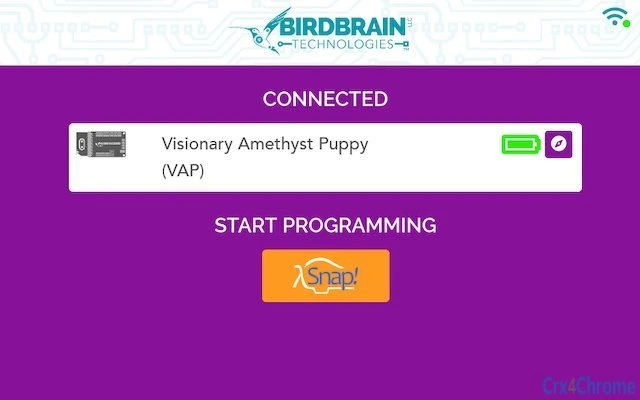
The BlueBird Connector features a minimal, task-focused interface designed for ease of use on Chromebook touchscreens and trackpads. Users initiate the process by connecting their device via USB, after which the tool automatically detects the hardware and establishes communication. A single button labeled "Open Snap!" launches the Snap! environment within the browser, eliminating the need for separate downloads or installations.
Navigating the interface is straightforward, with no complex menus or configuration steps. The workflow is linear: connect → detect → launch → program. This simplicity is ideal for younger users or those new to coding. The developer did not specify resource usage details, but based on general software behavior, the tool operates efficiently within Chrome OS’s web-based environment. Performance is expected to be stable on devices with standard USB and web browser capabilities, though exact CPU or RAM behavior was not disclosed.
Compatibility & System Requirements
The BlueBird Connector is designed exclusively for Chrome OS devices. It supports the Hummingbird Bit and micro:bit through USB connectivity, enabling direct programming from the Chromebook’s browser environment. The software has a file size of 32 MB, indicating a lightweight installation footprint suitable for devices with limited storage.
Exact system requirements were not listed by the developer. However, compatibility is likely dependent on Chrome OS version 80 or higher, USB port availability, and support for web-based applications like Snap!. The tool does not require additional drivers or software, as it leverages the built-in capabilities of Chrome OS and the web platform. For optimal performance, users should ensure their Chromebook is updated to the latest OS version.
Pros and Cons
Pros
- Seamless integration with Chrome OS and web-based Snap! environment
- One-click launch of programming interface with pre-configured blocks
- Supports both Hummingbird Bit and micro:bit devices
- Lightweight at only 32 MB
- Free to use, ideal for schools and budget-conscious learners
Cons
- Exclusive to Chrome OS—no support for Windows or macOS
- Dependent on USB connection; no wireless or Bluetooth functionality
- Performance details not publicly available
- Limited to web-based programming; offline use may be restricted
FAQ Section
Is the BlueBird Connector compatible with all Chromebooks?
While the tool is designed for Chrome OS, compatibility may vary depending on the device’s USB port type, Chrome OS version, and browser capabilities. The developer did not specify minimum hardware requirements.
Can I use this tool without an internet connection?
Access to the Snap! environment requires a web connection. Offline functionality is not supported, as the programming environment runs in the browser.
Does the BlueBird Connector require installation?
No installation is required. The tool runs directly from the Chrome OS environment after connecting the device via USB.
Is the software safe to use?
As a web-based tool developed by BlueBird Learning, it operates within the secure sandbox of Chrome OS. No additional permissions beyond USB access are required.
How often are updates released?
Update frequency is not specified. Users should check the official BlueBird Learning website for the latest version.
Final Thoughts + CTA
The BlueBird Connector stands out as a focused, effective solution for educators and students using Chromebooks in STEM learning. Its ability to connect Hummingbird Bit and micro:bit devices directly to Chrome OS via USB and launch a full-featured programming environment makes it a valuable asset in modern classrooms. While limited to Chrome OS and requiring a web connection, its simplicity, low resource use, and free access offer significant advantages for schools and individual learners.
For anyone teaching or learning programming with physical computing kits on a Chromebook, this tool delivers a reliable and intuitive experience. It removes technical barriers and puts creative coding within reach.
Download BlueBird Connector now
Guides & Tutorials for BlueBird Connector App for Chrome
How to install BlueBird Connector App for Chrome
- Click the Preview / Download button above.
- Once redirected, accept the terms and click Install.
- Wait for the BlueBird Connector App for Chrome download to finish on your device.
How to use BlueBird Connector App for Chrome
This software is primarily used for its core features described above. Open the app after installation to explore its capabilities.
User Reviews for BlueBird Connector App for Chrome 0
No reviews found





